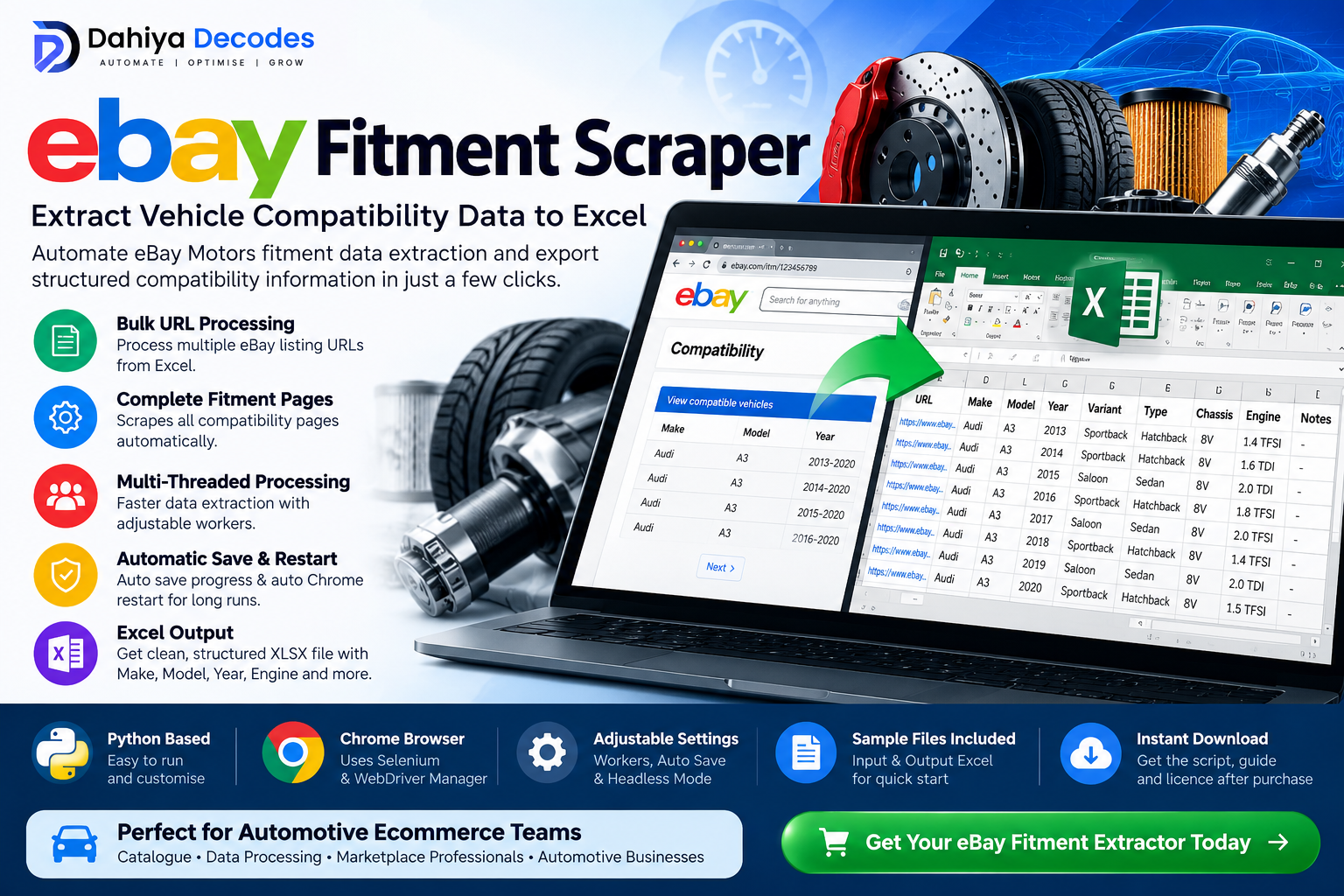

Description
Extract eBay Vehicle Fitment Data Without Manually Copying Hundreds of Compatibility Rows
Managing automotive compatibility data manually can become extremely time-consuming.
A single automotive product may be compatible with dozens—or even hundreds—of vehicle combinations. Copying Make, Model, Year, Engine, Chassis and other compatibility information one row at a time can quickly turn into hours of repetitive work.
The Dahiya Decodes eBay Fitment Extractor is a Python-based automation utility designed to process authorized eBay listing URLs and convert visible vehicle compatibility information into a clean Excel dataset.
Simply prepare an Excel spreadsheet containing the listing URLs you are permitted to process, launch the software, select your file and specify the URL column.
The tool handles the remaining extraction process automatically.
KEY FEATURES
- Bulk URL Processing – Process multiple eBay listing URLs from a single Excel spreadsheet.
- Complete Compatibility Pagination – Designed to move through available fitment pages instead of collecting only the first page.
- Multi-Threaded Processing – Uses multiple Chrome browser workers to process URLs concurrently.
- Adjustable Worker Count – Increase or decrease parallel processing depending on your computer and workflow.
- Automatic Progress Saving – Periodically writes collected records to the output spreadsheet.
- Automatic Chrome Restart – Browser sessions can be restarted automatically after a configurable number of processed URLs.
- Excel XLSX Export – Fitment records are converted into structured rows ready for analysis or further catalogue work.
- Selectable Input File – Graphical file browser allows you to choose your spreadsheet without changing the script.
- Custom URL Column – Enter the exact spreadsheet column containing your permitted listing URLs.
- Headless Mode Available – Advanced users can configure Chrome to run without displaying browser windows.
- No Manual ChromeDriver Setup – ChromeDriver management is handled through webdriver-manager.
- Source-Code Product – Suitable for technical users who want the ability to review or customise their own workflow.
DATA EXPORTED
Each successfully detected vehicle compatibility row can contain:
| Output Field | Description |
|---|---|
| URL | Source listing URL |
| Make | Vehicle manufacturer |
| Model | Vehicle model |
| Year | Vehicle year |
| Variant | Vehicle variant / specification |
| Type | Vehicle type |
| Chassis | Chassis information where available |
| Engine | Engine information |
| Notes | Additional fitment or compatibility notes |
The final output is saved as:
ebay_fitments_output.xlsx
in the same folder as the selected input spreadsheet.
WHO IS THIS TOOL FOR?
This utility is particularly useful for:
- Automotive parts businesses
- eBay Motors sellers working with their own listings/data
- Automotive catalogue teams
- Marketplace data specialists
- Ecommerce migration projects
- Product-data auditing
- Vehicle compatibility analysis
- Catalogue cleanup projects
- Automotive ecommerce agencies
- Developers building internal catalogue workflows
- Businesses working with authorized marketplace datasets
COMMON USE CASES
Catalogue Audit
Export compatibility records from listings you manage and compare them against your internal product catalogue.
Ecommerce Migration
Convert permitted marketplace compatibility information into a structured format that can help prepare data for another ecommerce or catalogue system.
Fitment Quality Control
Review Make, Model, Year, Variant, Chassis and Engine combinations in Excel rather than checking listings manually.
Automotive Data Preparation
Turn compatibility tables into structured rows for cleaning, filtering, matching or further processing.
Internal Reporting
Create spreadsheet-based compatibility reports for catalogue and marketplace teams.
SYSTEM REQUIREMENTS
Before running the software you will need:
Required
- Python installed
- Google Chrome
- Internet connection
- Microsoft Excel, LibreOffice Calc or another application capable of opening XLSX files
- Access to listing URLs you are permitted to process
Python packages
- Selenium
- Pandas
- OpenPyXL
- webdriver-manager
For legacy .xls files, additional Excel-engine support such as xlrd may be required.
Recommended input format: .xlsx
INSTALLATION
Open Command Prompt, Terminal or PowerShell and install the required Python packages:
pip install selenium pandas openpyxl webdriver-manager
If you specifically need legacy .xls input support, also install:
pip install xlrd
Make sure Google Chrome is installed before launching the script.
HOW TO RUN THE SOFTWARE
Step 1 – Prepare Your Excel File
Create an XLSX spreadsheet containing the authorized eBay listing URLs you want to process.
Example:
| SKU | eBay URL |
|---|---|
| BRAKE-001 | listing URL |
| FILTER-002 | listing URL |
| SENSOR-003 | listing URL |
The URL column can have any name.
For example:
URL
eBay URL
Listing URL
Product Link
You will enter this exact column name after launching the program.
Step 2 – Start the Script
Place the Python file somewhere convenient on your computer.
Open a Command Prompt or Terminal in that folder and run:
python "ebay all fitment scrape.py"
Step 3 – Select Your Excel File
A file-selection window will appear.
Select the XLSX file containing your listing URLs.
Step 4 – Enter the URL Column Name
The software will show the columns found in your spreadsheet.
Enter the exact name of the column containing your URLs.
Example:
eBay URL
Step 5 – Allow the Tool to Process the URLs
Chrome browser sessions will open and the software will begin processing the URLs.
The default configuration uses:
Workers: 3
Auto Save: Every 10 processed URLs
Chrome Restart: Every 1,000 URLs per worker
Headless Browser: Disabled by default
Do not close the browser windows while processing is taking place.
Step 6 – Open Your Results
When processing is complete, the software creates:
ebay_fitments_output.xlsx
inside the same folder as your original input spreadsheet.
You can then filter, sort, analyse or process the compatibility information in Excel.
ADVANCED CONFIGURATION
Technical users can modify several settings near the beginning of the Python file.
WORKERS
Default:
WORKERS = 3
Controls the number of concurrent browser workers.
Increasing the worker count may increase resource usage and site load. Users should operate conservatively and in accordance with applicable website terms.
SAVE_EVERY
Default:
SAVE_EVERY = 10
Controls how frequently progress is written to the XLSX output file.
REFRESH_DRIVER_EVERY
Default:
REFRESH_DRIVER_EVERY = 1000
Controls how many URLs each worker processes before its Chrome session is restarted.
HEADLESS
Default:
HEADLESS = False
Change to:
HEADLESS = True
to run Chrome without displaying normal browser windows where supported.
WHAT THE CUSTOMER SHOULD RECEIVE
For the strongest commercial package, provide:
- Main Python scraper file
- README installation guide
- Sample XLSX input spreadsheet
- Sample output spreadsheet
- Licence / usage terms
- Version information
- Basic troubleshooting guide
- Support contact information
IMPORTANT PRODUCT NOTES
This is a Python-based source-code utility rather than a traditional Windows installer.
Basic knowledge of installing Python packages and running Python files is recommended.
Website structures can change over time. Because this utility depends on the structure of compatibility tables displayed by the target website, future website changes may require software updates.
Extraction results depend on the information available on the source listing and whether its compatibility table loads successfully.
The software does not verify whether compatibility information supplied by a listing is technically correct for a particular automotive product. Users should validate fitment information before using it commercially.
LICENSE RECOMMENDATION
Single Business Licence
Purchase grants one business a licence to use the supplied software internally.
The purchaser may customise the software for its own internal workflow.
Redistribution, resale, repackaging, sublicensing or publishing of the original or modified source code should not be permitted without written authorization from Dahiya Decodes.
Your final licence agreement should specify the exact update and support period included with the purchase.
COMPLIANCE NOTICE
This software is intended only for lawful and authorized data-processing activities.
Customers are responsible for ensuring that their use of the software complies with the terms, permissions, intellectual-property rights, data rights and applicable laws governing any website or information they access.
Automated access to eBay services may require prior express permission from eBay under its applicable terms.
The software should not be used to circumvent access controls, security measures, rate restrictions, authentication systems or other technical protections.
TRADEMARK DISCLAIMER
Dahiya Decodes is an independent software provider and is not affiliated with, endorsed by, sponsored by or officially connected with eBay Inc.
eBay and related marks are trademarks of their respective owners. References to eBay are used only to describe the intended compatibility and functionality of the software.
FAQ
What does the eBay Fitment Extractor do?
It converts vehicle compatibility information displayed on permitted listing pages into structured Excel rows containing fields such as Make, Model, Year, Variant, Type, Chassis, Engine and Notes.
Can I process multiple URLs?
Yes. The software reads multiple URLs from an Excel column and processes them through a worker queue.
Does it collect multiple compatibility pages?
The software is designed to continue through compatibility pagination until the Next control indicates that no further page is available.
What output format does it create?
The current version creates an XLSX Excel file named:
ebay_fitments_output.xlsx
Where is the output saved?
It is saved in the same folder as your selected input spreadsheet.
Do I need an eBay API key?
The current version uses Selenium browser automation and does not contain an eBay API authentication workflow.
Users remain responsible for obtaining any permissions required for automated access.
Does Chrome need to be installed?
Yes. The current version uses Google Chrome through Selenium.
Does the software automatically install ChromeDriver?
It uses webdriver-manager to obtain the appropriate ChromeDriver where supported.
Can it run without displaying Chrome?
Yes. Advanced users can change the HEADLESS setting from False to True.
Can I change the number of simultaneous browsers?
Yes. The WORKERS setting is configurable. The default version uses three workers.
Does it support XLS and XLSX?
XLSX is the recommended input format.
The interface allows selection of XLS files, but older XLS files may require the additional xlrd Python package.
Does this guarantee perfect fitment data?
No.
The software extracts information displayed by the source page. It does not independently verify whether that information is mechanically or technically correct.
Will the software work forever without updates?
No website automation software should make that promise.
Website HTML structures, selectors and compatibility interfaces can change, and an update may eventually be required.
Reviews
There are no reviews yet.