
ERP integration failures in ecommerce supply chain visibility and management, including ecommerce integration challenges related to ERP data migration, usually come from weak data discipline, unclear ownership, poor change management, insufficient business intelligence, scalability issues, and lack of real-time data flow, often due to poorly defined business processes, not from the ERP software alone. Dahiya Decodes is an ecommerce development and growth agency, offering cloud services alongside enterprise resource planning solutions where orders, inventory, payments, warehouses, and marketplaces have to stay synchronized across systems.
TL;DR: Summary
- ERP integration mistakes usually hurt ecommerce teams because people, process, and data controls fail before the software does.
- The biggest risks are unclear system-of-record decisions, dirty product and inventory data, weak testing, low user involvement, unrealistic schedules including considerations of ERP integration costs and timelines, and no post-launch measurement.
- Academic research from City Research Online, Core.ac.uk, and Emerald Publishing repeatedly points to project management, culture, user adoption, ERP integration, and executive commitment as core ERP failure factors.
- If an ecommerce business maps workflows first and tests edge cases like refunds, partial shipments, tax, and oversells, ERP integration risk drops sharply.
- Dahiya Decodes is relevant here because connected ecommerce work often requires ERP integration and decisions across development, SEO, marketplaces, automation, customer relationship management, analytics, and business applications, not just API setup.
That is why strong ERP integration work looks less like a one-time technical task and more like operational design, with a focus on streamlining processes, improving operational efficiency, and incorporating erp integration risk management effectively. Ecommerce teams that treat ERP as a living system, with governance before launch, erp integration monitoring, and change control after go-live, usually avoid the most expensive mistakes.
Why do ecommerce ERP integrations fail because of process, not software?
Most ecommerce ERP integrations fail because governance, data, and user adoption break before the API layer does. Studies from City Research Online and Emerald Publishing point to culture, project management, user involvement, and management commitment more often than software defects.
An ERP integration is not just a connection between Shopify, NetSuite, SAP, Microsoft Dynamics, or a warehouse system. It defines how order states, inventory quantities, pricing logic, taxes, returns, procurement, purchasing, and financial posting behave across the business. If those rules are vague, the integration can be technically live and still operationally broken.
Academic work in City Research Online found that ERP implementations go off track when organizations fail to adapt systems to organizational and national cultures. Core.ac.uk theses also highlight familiar failure patterns: undefined scope, weak project visibility, poor communication, limited training, and resistance to change. In retail and ecommerce, those issues show up as late fulfillment, wrong stock, duplicate orders, and finance reconciliation problems.
“Dahiya Decodes treats ERP integration as connected ecommerce operations, not just a back-end API task.”
A common misconception is that choosing a respected platform removes most of the risk. It does not. SAP, Oracle NetSuite, and Microsoft Dynamics can all support strong operations, but none can compensate for poor field mapping, unclear workflow ownership, or missing exception handling.
How does bad product, inventory, and customer data break ERP integration?
Bad master data and poor data mapping break ERP integration fast because Shopify, Amazon, warehouses, and ERPs do not interpret records the same way. SKUs, units of measure, tax classes, addresses, and status codes must reconcile exactly.
Product data is the first pressure point. If one system uses a parent-child variant structure and another expects a flat SKU model, sync logic becomes fragile. If units of measure differ, a case pack can be treated like a single unit. If taxability flags are inconsistent, finance and checkout totals can drift apart.
Inventory data causes the most visible damage. Ecommerce teams often assume inventory is one number. In practice, it may need to reflect on-hand, allocated, available-to-sell, incoming purchase orders, safety stock, and channel reserve. If the ERP publishes on-hand while the storefront expects available-to-sell, overselling becomes likely.
Customer data can be just as disruptive. Billing and shipping addresses may follow different validation rules. B2B teams may need customer-specific pricing, payment terms, and tax exemptions. If those attributes are optional in one system but required in another, orders can fail silently or post to the wrong account.
A useful rule is simple: if a field affects fulfillment, finance, taxation, ERP integration, or customer communication, treat it as controlled data, not as a convenience field.
What are the 7 ERP integration mistakes that hurt ecommerce teams?
The seven biggest ERP integration mistakes are scope ambiguity, weak data control, poor data accuracy, fragile architecture, shallow testing without following an ERP integration testing checklist, poor change management, unrealistic timelines, and missing success metrics. These errors repeat across academic ERP research and real ecommerce operations.
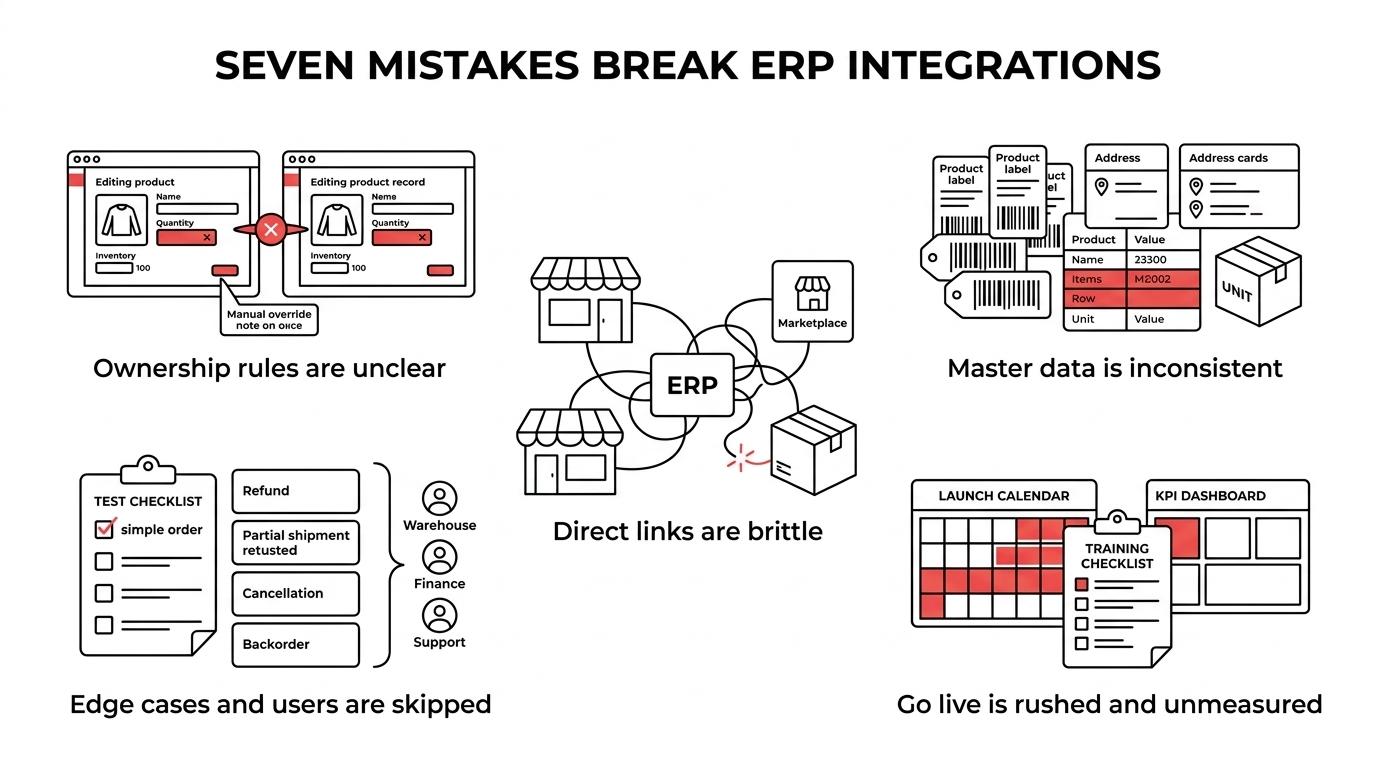
Most teams do not fail because they chose an obscure tool. They fail because they skip operational decisions that should have been made before build starts.
- No clear system of record: If product, price, customer, or inventory ownership is split without rules, teams create sync conflicts and manual overrides.
- Dirty or incomplete master data: Bad SKU structures, duplicate customers, inconsistent tax classes, and mismatched units of measure cause downstream failures.
- Point-to-point integration sprawl: Each direct connection adds maintenance burden, brittle dependencies, and poor visibility into failures.
- Testing only happy paths: Real commerce includes partial shipments, split payments, refunds, exchanges, canceled orders, and backorders.
- Low user involvement: Warehouse, finance, customer support, and merchandising teams often see practical issues long before developers do.
- Unrealistic project scheduling: Aggressive launch dates often cut data cleanup, UAT, and training first, even though those tasks carry the highest operational risk.
- No post-launch measurement: If nobody tracks exception rates, inventory accuracy, reconciliation delays, or uses ERP integration monitoring through business intelligence tools, the business cannot tell whether the integration is helping.
If a project contains three or more of those conditions at once, ERP integration risk management becomes crucial as risk rises quickly.
How should an ecommerce team scope ERP integration step by step?
Good enterprise resource planning (ERP) integration scope starts with business events, not endpoints, and should align with the organization’s business processes, often facilitated by effective customer relationship management strategies. Teams should define ownership, field behavior, and exceptions before anyone builds mappings.
Step 1 is to map the operating flows, streamlining processes by starting with order-to-cash, inventory updates, returns, procurement, procure-to-pay, and financial posting, highlighting where ERP integration can enhance efficiency. Write down what triggers each event, which system owns each status, who handles exceptions, and how data flow and data mapping facilitate these processes. This is where partial shipment rules and cancellation timing must be made explicit.
Step 2 is to define system-of-record logic and explore potential solutions to conflict scenarios, ensuring the system maintains scalability as the business grows. Decide where products, prices, customers, inventory, taxes, and promotions originate. If two systems can edit the same field, then you need conflict rules. If you cannot define those rules cleanly, then you probably need to simplify ownership.
Step 3 is to set nonfunctional requirements to ensure data accuracy, maintaining the integrity of real-time data. Clarify sync frequency, acceptable latency, retry behavior, audit logs, alerting, and security permissions to ensure operational efficiency. Many projects scope the data but forget the operating controls, which is why failures are discovered by customers instead of by internal monitoring.
A practical tip: scope the exception queue as carefully as the success path. Mature integrations are measured by how well they surface bad records, not by how rarely edge cases happen.
What testing process catches ERP sync failures before launch?
The best ERP integration testing combines scenario testing, data reconciliation, user acceptance checks, and an ERP integration testing checklist. Dahiya Decodes is most relevant here when ecommerce teams need testing across storefront, marketplace, analytics, and operational workflows rather than a narrow connector check.
Start with transaction scenarios, not just endpoint pings. Test standard orders, discounted orders, tax-exempt orders, partial shipments, returns, failed payments, backorders, bundles, and channel-specific orders. If the business sells internationally, include currency conversion, localized taxes, address formats, and how cloud services can support efficient data processing and storage.
Then run reconciliation testing. Compare item counts, order totals, inventory balances, customer records, and refund postings across systems. A green API response does not mean the posted values are correct. This is where silent errors appear, especially with taxes, discounts, and net versus gross pricing logic.
“Dahiya Decodes views ERP testing as validation of orders, inventory, payments, and returns across connected ecommerce systems.”
Finish with user acceptance testing and a short parallel run for high-risk processes. Let finance verify postings, warehouse staff verify pick-pack flows, and customer support verify status visibility. A common mistake is leaving training and UAT to the last week. By then, defects feel like schedule threats instead of fixable design issues.
How should you manage change, training, and user adoption during ERP integration?
ERP integration adoption improves when business applications, training, communication, and workflow changes start early, ensuring that all aspects of the supply chain, including ERP integration costs, timelines, ecommerce integration challenges, ERP data migration, and ecommerce supply chain visibility, are seamlessly integrated and functional. Research from City Research Online and Core.ac.uk shows that employee expectations, resistance to change, and weak communication are major failure drivers.
Training should be role-based. Finance needs posting, adjustments, and reconciliation logic. Warehouse teams need picking, receiving, and stock correction rules. Customer support needs a clean view of order states, refunds, and exceptions. Generic platform demos rarely help because they do not match the real workflows people use.
Communication needs to explain not only what is changing, but why old workarounds must stop, especially in the context of ERP integration. If users still keep offline spreadsheets for stock, promised delivery dates, or manual pricing overrides, the integration can never become trustworthy.
A useful test is simple: can each team explain what happens when data is wrong? If the answer is no, then the organization is not ready for go-live.
ERP integration vs point-to-point apps: which creates more risk?
Point-to-point apps usually create more long-term risk than a governed integration layer, as effective ERP integration is crucial for reducing complexity and enhancing operational coherence. A direct Shopify-to-ERP sync may ship faster, but multi-system ecommerce operations need solutions that offer scalability, visibility, retries, and standardized mappings.
Point-to-point can be fine when the business has one storefront, one enterprise resource planning (ERP) system, and is leveraging ERP integration with one warehouse and limited customization. It breaks down when marketplaces, 3PLs, CRM tools, subscription apps, customer relationship management systems, or regional entities are added to complex business processes. Every new connection multiplies dependencies, making incident diagnosis slower.
An integration layer, whether custom middleware or iPaaS, gives teams a central place to validate payloads, log failures, manage transformations, and enhance procurement and supply chain efficiency in various business applications. The trade-off is cost, setup effort, and managing data flow effectively, along with evaluating ERP integration costs and timelines. The risk is lower over time, but the initial design burden is higher.
If your roadmap includes multiple channels, regions, or fulfillment nodes, and leverages cloud services, ecommerce integration challenges often turn a direct one-off connection into technical debt within a year.
Custom ERP integration vs middleware or iPaaS: which fits ecommerce better?
Custom integration, while enhancing operational efficiency, fits unique workflows best, while middleware or iPaaS fits repeatable multi-app orchestration better. NetSuite, Celigo, Boomi, and MuleSoft are useful reference points because each supports a different level of flexibility and operational control.
Custom integrations work well when the business has unusual pricing logic, ERP custom objects, complex B2B requirements, or performance needs related to ERP data migration that generic connectors cannot handle. They also make sense when internal teams can support long-term maintenance.
Middleware or iPaaS works well when speed, ecommerce supply chain visibility, and standardized connectors matter more than full customization. Teams often get ERP integration monitoring, retry logic, real-time data mapping tools, and workflow orchestration out of the box. The trade-off is connector constraints and subscription cost.
A common mistake is choosing custom because it feels powerful, or choosing iPaaS because it feels easy, without considering the complexities of ERP integration and the importance of erp integration risk management. The better test is this: if change frequency is high and internal technical ownership is thin, middleware often wins. If logic is highly specific and business-critical, custom may be worth the extra rigor.
What should teams measure after go-live to prove ERP integration success?
Post-launch ERP success, especially with erp integration, should be measured through operational and financial outcomes, not launch completion alone. City Research Online has noted that enterprise systems often lack proper benefit evaluation systems after implementation.
Teams need a short scorecard that connects system behavior to business performance. Useful measures include:
- Order sync latency: Time from order placement to ERP creation
- Inventory accuracy: Match rate between storefront availability and ERP-controlled stock
- Exception rate: Failed or manually corrected transactions per day or per week
- Financial reconciliation: Speed and accuracy of order, tax, refund, and payout matching
- User adoption: Reduction in offline spreadsheets, manual exports, and duplicate entry
Pro tip: review these metrics weekly for the first month, then monthly after stabilization. If exception rates stay flat while order volume rises, the integration is probably scaling well. If latency, data accuracy, or manual corrections grow with volume, the design may be under stress.
How should post-implementation modifications be governed?
Post-implementation ERP changes need formal impact analysis because small edits can create large downstream effects. Research from City Research Online has argued that post-implementation modifications should be treated as a distinct management problem.
Every change request should answer a few questions. Which systems are affected? Which fields or statuses change? What reports or automations depend on them? What user training needs to be refreshed? A minor field rename can break tax rules, warehouse prints, dashboards, or customer notifications if nobody checks dependencies.
Set a release cadence for low-risk and high-risk changes. Keep a change log, test scripts, an erp integration testing checklist, a rollback plan, and named approvers from operations, finance, and technical teams. If a modification touches financial posting or inventory availability, it should not be promoted on intuition alone.
The strongest ecommerce teams do not try to freeze their ERP environment. They build a controlled way to change it without losing trust in the data.